EduContacts Developer Guide
- Acknowledgements
- Setting up, getting started
- Design
- Implementation
- Documentation, logging, testing, configuration, dev-ops
- Appendix
- Requirements
- Instructions for Manual Testing
- Effort
- Planned Enhancements
- 1. Overly General Error Message for Duplicate Command Word
- 2. Overly General Error Message for Duplicate IDs in Commands
- 3. Address Help Command Popup Window Stability Issue
- 4. StudentID as Duplicate Detection Mechanism
- 5. Support for Multiple Filter Conditions
- 6. Toggle for Partial vs Full Matching in Filter Command
- 7. Support for Additional and Customizable Roles
- 8. Support for Contacts Being Tagged with Multiple Roles
- 9. Enhanced Module Utility
- 10. Module Not Applicable for Certain Contacts
- New Features
Acknowledgements
This project is based on the AddressBook-Level3 project created by the SE-EDU initiative (UG, DG, GitHub Page).
Setting up, getting started
Refer to the guide Setting up and getting started.
Design
Architecture
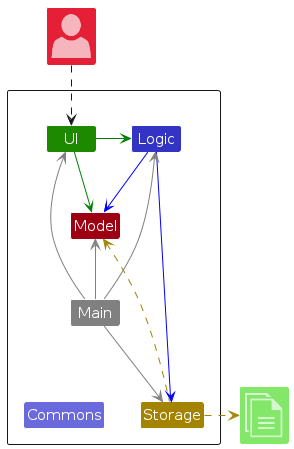
The Architecture Diagram given above explains the high-level design of the App.
Given below is a quick overview of main components and how they interact with each other.
Main components of the architecture
Main (consisting of classes Main and MainApp) is in charge of the app launch and shut down.
- At app launch, it initializes the other components in the correct sequence, and connects them up with each other.
- At shut down, it shuts down the other components and invokes cleanup methods where necessary.
The bulk of the app's work is done by the following four components:
UI: The UI of the App.Logic: The command executor.Model: Holds the data of the App in memory.Storage: Reads data from, and writes data to, the hard disk.
Commons represents a collection of classes used by multiple other components.
How the architecture components interact with each other
The Sequence Diagram below shows how the components interact with each other for the scenario where the user issues the command delete 12345678.
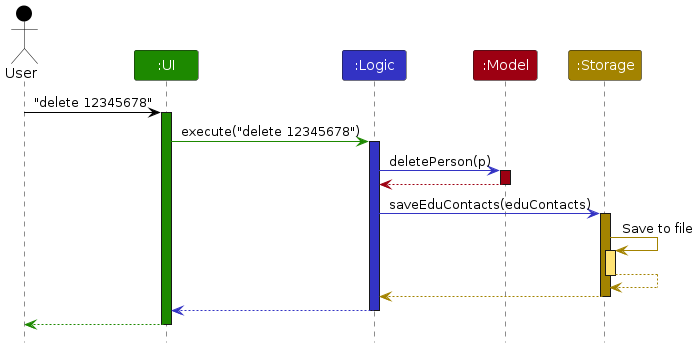
Each of the four main components (also shown in the diagram above),
- defines its API in an
interfacewith the same name as the Component. - implements its functionality using a concrete
{Component Name}Managerclass (which follows the corresponding APIinterfacementioned in the previous point.
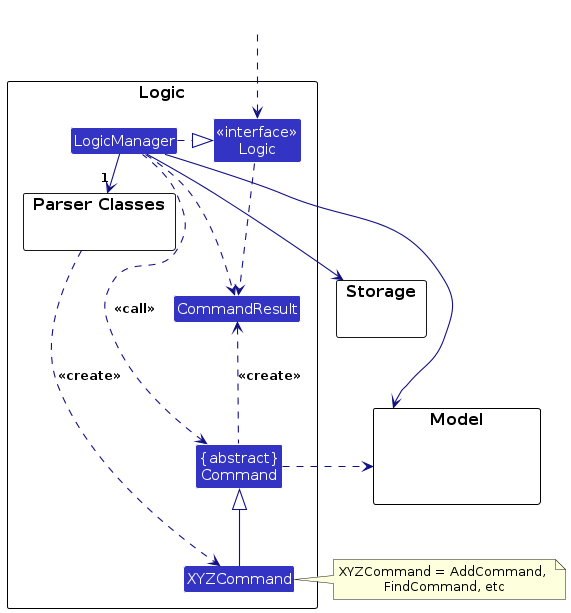
For example, the Logic component defines its API in the Logic.java interface and implements its functionality using the LogicManager.java class which follows the Logic interface. Other components interact with a given component through its interface rather than the concrete class (reason: to prevent outside component's being coupled to the implementation of a component), as illustrated in the (partial) class diagram below.
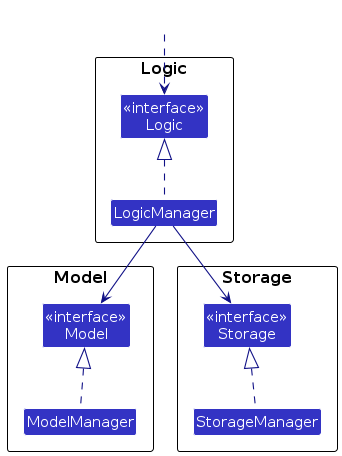
The sections below give more details of each component.
UI component
The API of this component is specified in Ui.java
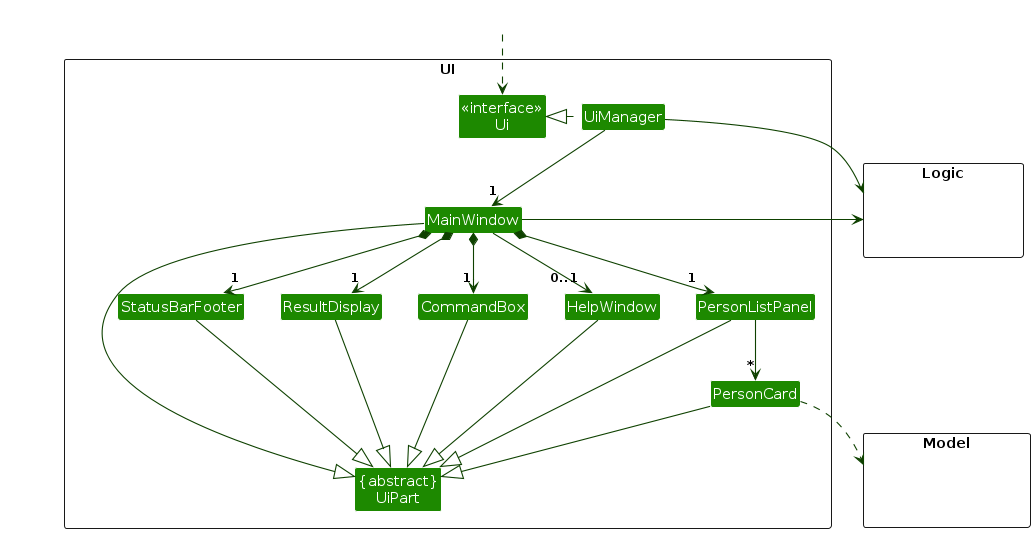
The UI is managed by the UiManager class, which serves as the main controller for managing the UI in EduContacts.
It serves as the interface layer between the application's backend logic and the JavaFX UI components, ensuring a smooth
and consistent user experience.
The UI consists of a MainWindow that is made up of the following parts:
CommandBox- Where the user types in his desired command
- Integrates with
CommandHistoryto provide an efficient command-tracking mechanism, allowing users to navigate through previously entered commands using theUPandDOWNarrow keys.
ResultDisplay- Where the resulting confirmation of the latest command sent or any corresponding error messages is shown to the user
PersonListPanel- The panel which holds the list of persons in EduContacts, each person represented by a
PersonCard
- The panel which holds the list of persons in EduContacts, each person represented by a
StatusBarFooter- Designed to show the save location of EduContacts' data
PersonDetails- A section of the UI that renders when a
FindCommandis run, showing the resulting person's full details
- A section of the UI that renders when a
PersonCard- Shows simple and brief details about a person
HelpWindow- Displayed by clicking the "Help" button at the top right hand of the screen
All these, including the MainWindow, inherit from the abstract UiPart class which captures the commonalities between
classes that represent parts of the visible GUI.
The UI component uses the JavaFx UI framework. The layout of these UI parts are defined in matching .fxml files that
are in the src/main/resources/view folder. For example, the layout of the
MainWindow
is specified in MainWindow.fxml
The UI component,
- executes user commands using the
Logiccomponent. - listens for changes to
Modeldata so that the UI can be updated with the modified data. - keeps a reference to the
Logiccomponent, because theUIrelies on theLogicto execute commands. - depends on some classes in the
Modelcomponent, as it displaysPersonobject residing in theModel.
CommandHistory Integration
The CommandHistory class, located in seedu.address.ui.util, is responsible for tracking user-entered commands.
It enhances the CommandBox functionality by allowing users to navigate through their command history with the
UP and DOWN arrow keys. This design keeps the command history encapsulated and separate from other UI components,
promoting modularity and adhering to good OOP practices.
The stylesheet used for the UI can be found in src/main/java/resources/view/LightTheme.css.
Logic component
API : Logic.java
Here's a (partial) class diagram of the Logic component:
The sequence diagram below illustrates the interactions within the Logic component, taking execute("delete 12345678") API call as an example.
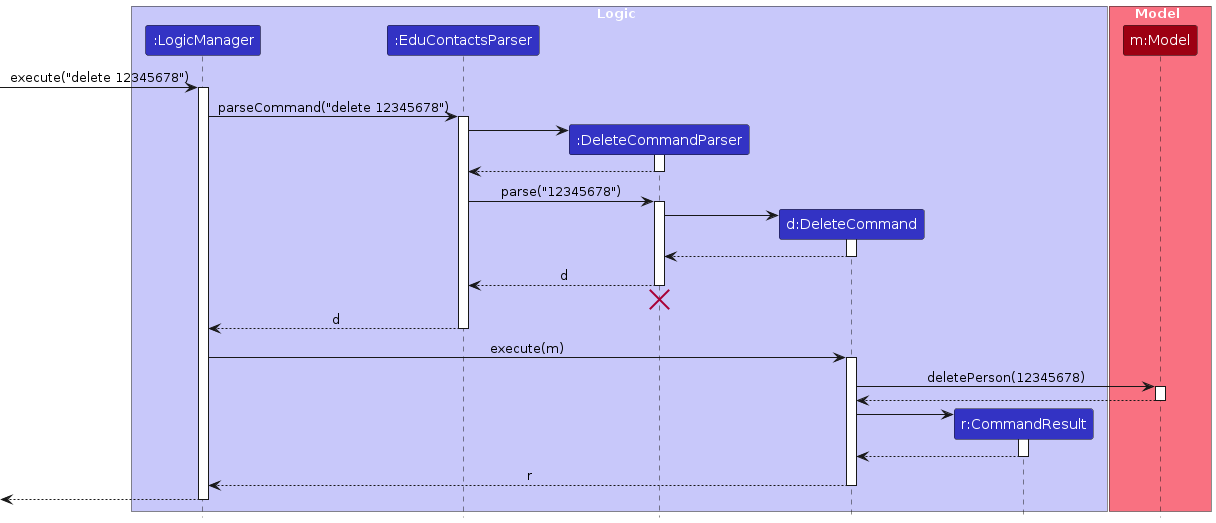
Note: The lifeline for DeleteCommandParser should end at the destroy marker (X) but due to a limitation of PlantUML, the lifeline continues till the end of diagram.
How the Logic component works:
- When
Logicis called upon to execute a command, it is passed to anEduContactsParserobject which in turn creates a parser that matches the command (e.g.,DeleteCommandParser) and uses it to parse the command. - This results in a
Commandobject (more precisely, an object of one of its subclasses e.g.,DeleteCommand) which is executed by theLogicManager. - The command can communicate with the
Modelwhen it is executed (e.g. to delete a person).
Note that although this is shown as a single step in the diagram above (for simplicity), in the code it can take several interactions (between the command object and theModel) to achieve. - The result of the command execution is encapsulated as a
CommandResultobject which is returned back fromLogic.
Here are the other classes in Logic (omitted from the class diagram above) that are used for parsing a user command:
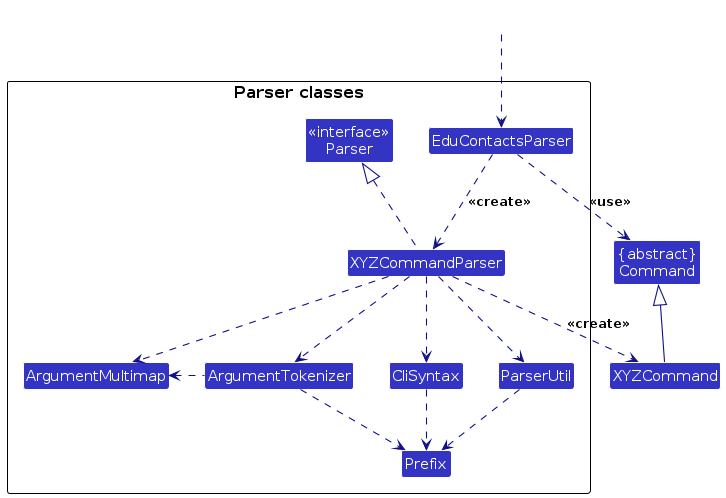
How the parsing works:
- When called upon to parse a user command, the
EduContactsParserclass creates anXYZCommandParser(XYZis a placeholder for the specific command name e.g.,AddCommandParser) which uses the other classes shown above to parse the user command and create aXYZCommandobject (e.g.,AddCommand) which theEduContactsParserreturns back as aCommandobject. - All
XYZCommandParserclasses (e.g.,AddCommandParser,DeleteCommandParser, ...) inherit from theParserinterface so that they can be treated similarly where possible e.g, during testing.
Model component
API : Model.java
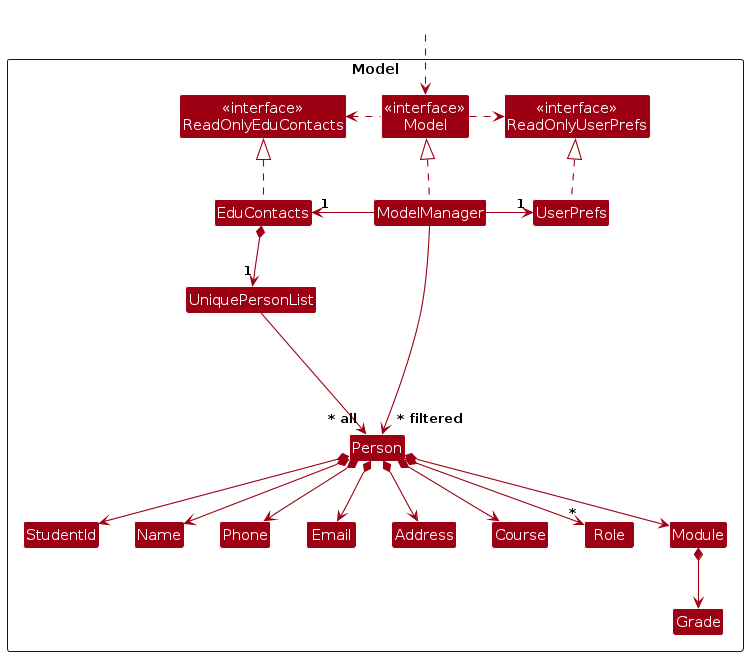
The Model component,
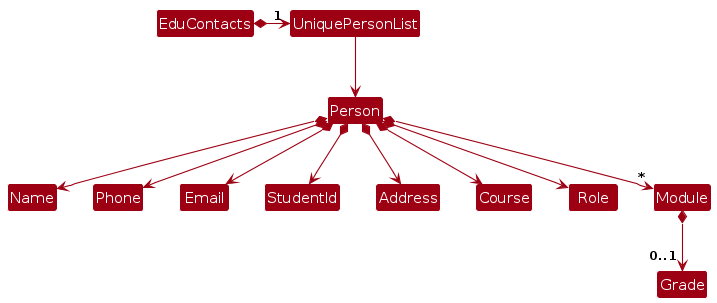
- stores the contact data i.e., all
Personobjects (which are contained in aUniquePersonListobject).- a
Personobject storesStudentId,Name,Address,Phone,Email,Role,Courseobjects. - contains an ArrayList of
Moduleobjects which is optional.
- a
- stores the currently 'selected'
Personobjects (e.g., results of a search query) as a separate filtered list which is exposed to outsiders as an unmodifiableObservableList<Person>that can be 'observed' e.g. the UI can be bound to this list so that the UI automatically updates when the data in the list change. - stores a
UserPrefobject that represents the user’s preferences. This is exposed to the outside as aReadOnlyUserPrefobjects. - is intentionally designed to be independent of other components (e.g., UI, Logic, Storage) to maintain a clean separation of concerns. This ensures that the Model layer is solely responsible for managing data and that data structures make sense on their own. This independence enables easier maintenance, testing, and adaptability of the data structures, as changes in one component (e.g., UI) do not affect the Model.
Note: An alternative (arguably, a more OOP) model is given below. It has a Role list in the AddressBook, which Person references. This allows AddressBook to only require one Role object per unique role, instead of each Person needing their own Role objects.
Storage component
API : Storage.java
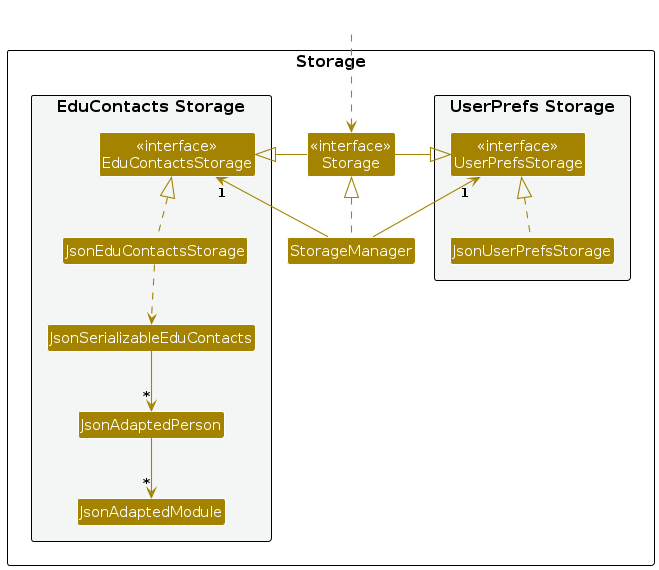
The Storage component has a key role in persisting data across user sessions. Specifically, it,
can save both EduContacts data and user preference data in JSON format. Upon application startup, it reads the saved JSON data back into the app, reconstructing it into the corresponding objects in the
Modelcomponent.inherits from both
EduContactsStorageandUserPrefStorage, which means it can be treated as either one (if only the functionality of only one is needed).depends on some classes in the
Modelcomponent to serialize and deserialize data, because theStoragecomponent's job is to save/retrieve objects that belong to theModel. This dependency allows it to handle domain-specific structures, likePersonandUserPrefs, ensuring the saved data aligns with the current application state and structure.uses exception handling to manage file I/O issues (e.g., missing or corrupted files) and provides feedback to the user if data loading or saving encounters an issue, ensuring that the application can gracefully handle storage-related errors.
Common classes
Classes used by multiple components are in the seedu.address.commons package.
Implementation
This section describes some noteworthy details on how certain features are implemented.
Note: The execution of commands mentioned in this section follows a similar path to that depicted in the sequence diagram under the Logic component section and will not be discussed in this section.
Module feature
The module feature allows users to keep track of modules a Person in EduContacts is taking. Each Person object has a List<Module> field that encapsulates the list of modules the Person is taking.
Adding a Module:
Users are able to add a Module to a Person's list of modules using the ModuleCommand. Given below is an example usage scenario of the ModuleCommand.
Step 1. The user launches the application, which is populated with a list of their students. One of the students has StudentId of 12345678. Let's refer to this Person as Alex.
Step 2. The user executes module 12345678 m/CS2103T command to add the CS2103T Module to Alex's list of modules. Alex now has a CS2103T Module in their list of modules.
Editing a Module:
The user is able to edit a Module in a Person's list of modules using the EditCommand. Given below is an example usage scenario of the EditCommand.
Step 1. The user launches the application, which is populated with a list of their students. One of the students has StudentId of 87654321 and a CS2103T Module in their list of modules. Let's refer to this Person as Bernice.
Step 2. The user executes edit 12345678 m/CS2103T CS2103 command to edit the CS2103T Module to CS2103. Bernice now has a CS2103 Module in their list of modules instead of a CS2103T Module.
Deleting a Module:
The user is able to delete a Module from a Person's list of modules using the DeleteCommand. Given below is an example usage scenario of the DeleteCommand.
Step 1. The user launches the application, which is populated with a list of their students. One of the students has StudentId of 87654321 and a CS2103T Module in their list of modules. Let's refer to this Person as Bernice.
Step 2. The user executes delete 12345678 m/CS2103T command to delete the CS2103T Module from Bernice's list of modules. Bernice now no longer has a CS2103T Module in their list of modules.
Grade feature
The grade feature allows users to assign a Grade to a Module of a Student in EduContacts. Each Module object has a Grade field.
Users are able to assign a Grade to a Module using the GradeCommand. Given below is an example usage scenario of the GradeCommand.
Step 1. The user launches the application, which is populated with a list of their students. One of the students has StudentId of 87654321 and a CS2103T Module in their list of modules. Let's refer to this Student as Bernice.
Step 2. The user executes grade 87654321 m/CS2103T g/A command to assign an A Grade to Bernice's CS2103T Module. Bernice now has a CS2103T Module graded A in their list of modules.
Documentation, logging, testing, configuration, dev-ops
Appendix: Requirements
Product scope
Target user profile:
- Teachers in tertiary institutions.
- Has a need to manage a significant number of contacts.
- Requires a tool to keep communication organised across large groups.
- Requires dedicated support for tracking of academic progress.
- Prefers typing and is familiar with command-line interfaces.
Value proposition: Provides teachers comfortable with CLI-based interfaces an efficient platform for contact management and student academic progress tracking.
User stories
Priorities: High (must have) - * * *, Medium (nice to have) - * *, Low (unlikely to have) - *
| Priority | As a … | I want to … | So that I can… |
|---|---|---|---|
* * * | teacher | add a contact | have easy access to contacts |
* * * | teacher | delete a contact | remove contacts that I no longer need |
* * * | teacher | add contact details like email, address, phone number, modules etc. | keep track of my contacts' details |
* * * | teacher | assign a grade to a module that my student is taking | keep track of a student's grades and academic progress |
* * * | teacher | view contact information | have a clear visual reference for contact information |
* * | teacher | edit a contact | update contact information without having to delete it |
* * | teacher | search for a contact | find the contact I am looking for without having to scroll through the list |
* * | teacher | add roles/tags to contacts | group the many contacts that are in the application by their type (e.g. student, tutor etc.) |
* * | teacher | filter contacts by labels or tags | have an easy visual reference with irrelevant contacts filtered out |
* * | new user | access a page that teaches me how to use the application | familiarise myself with the application interface |
* * | efficient CLI user | navigate command history (like in other CLI-based applications) | easily load previously entered commands without having to re-type commands from scratch (to save time) |
* | new user | see the application populated with sample data | see what the application interface looks like |
* | mistake-prone user | undo previous action | undo a mistake without having to delete or edit any contacts |
* | teacher with many contacts | perform mass operations on contacts | perform operations (add, edit, delete etc.) on multiple contacts without having to do so one by one |
* | organised teacher | archive contacts | reduce clutter in the application without permanently deleting the contact |
* | careful teacher | export contact data | have a backup data file in case anything happens to the application |
* | careful teacher | import contact data | load data from a file to restore lost or missing data |
Use cases
(For all use cases below, the System is the EduContacts and the Actor is the user, unless specified otherwise)
UC01 - Add a contact
MSS
User adds a contact to the list of contacts.
EduContacts updates the list of contacts.
Use case ends.
Extensions
1a. EduContacts detects an error in the user input.
1a1. EduContacts provides an appropriate error message as feedback to user.
Use case ends.
UC02 - Search for a student
Preconditions: The list of contacts is not empty.
MSS
User provides details of the student.
EduContacts displays the student and their details.
Use case ends.
Extensions
1a. EduContacts detects an error in the user input (command format, student does not exist etc.).
1a1. EduContacts provides an appropriate error message as feedback to user.
Use case ends.
UC03 - Add a module to a student
MSS
User searches for the student (UC02) they wish to add a module for.
User adds a module to the student in the list.
EduContacts updates the list of contacts.
Use case ends.
Extensions
1a. EduContacts detects an error in the user input (command format, student does not exist, duplicate module etc.).
1a1. EduContacts provides an appropriate error message as feedback to user.
Use case ends.
UC04 - Add a grade for a student
Preconditions: The student has a module already added (UC03).
MSS
User searches for the student (UC02) they wish to add a grade for.
User adds a grade for the student.
EduContacts updates the list of contacts.
Use case ends.
Extensions
1a. EduContacts detects an error in the user input (command format, student or module does not exist etc.).
1a1. EduContacts provides an appropriate error message as feedback to user.
Use case ends.
2a. The module is already graded.
2a1. EduContacts overwrites the old grade with the new grade.
Use case ends.
Use case: UC05 - Delete a student
MSS
User searches for the student (UC02) they wish to delete from the list.
User deletes the student in the list.
EduContacts updates the list of contacts.
Use case ends.
Extensions
1a. EduContacts detects an error in the user input (command format, student does not exist etc.).
1a1. EduContacts provides an appropriate error message as feedback to user.
Use case ends.
Use case: UC06 - Edit a student's details
MSS
User searches for the student (UC02) they wish to edit.
User edits the details of the student in the list.
EduContacts updates the list of contacts.
Use case ends.
Extensions
1a. EduContacts detects an error in the user input (command format, student does not exist etc.).
1a1. EduContacts provides an appropriate error message as feedback to user.
Use case ends.
UC07 - Filter contacts based on properties
MSS
User provides a set of contact-related conditions.
EduContacts updates the list view to show contacts matching the provided conditions.
Use case ends.
Extensions
1a. EduContacts detects an error in the user input (command format etc.).
1a1. EduContacts provides an appropriate error message as feedback to user.
Use case ends.
Non-Functional Requirements
- Data Requirements
- EduContacts must be capable of storing up to 1000 students’ contact details and academic data without significant performance degradation
- Contact and student data will not change frequently, but updates must be handled seamlessly (e.g., adding, updating, or deleting student details).
- Portability
- Should work on any mainstream OS as long as it has Java
17or above installed. - EduContacts must be packaged in a single JAR file (or ZIP if additional resources are required). It should not require installation, making it easy to use on any system that supports Java 17.
- All data must be stored locally in human-readable text files, making it easy to back up or transfer data between systems.
- Should work on any mainstream OS as long as it has Java
- Scalability
- The system should be designed with extensibility in mind, allowing new features (e.g., tracking student behavior) to be added without significantly altering the existing codebase.
- The system should be capable of supporting more than 1000 contacts if needed, with the ability to upgrade to handle larger datasets without performance degradation.
- Accessibility
- A user with above average typing speed for regular English text (i.e. not code, not system admin commands) should be able to accomplish most of the tasks faster using commands than using the mouse.
- The user interface should be accessible to users with disabilities, adhering to standard accessibility guidelines to accommodate screen readers and keyboard navigation.
- The system should be easy to use for educators, with a simple CLI for fast input and an intuitive GUI for viewing contact information and reports.
- Efficiency
- The system should respond within 1 second for typical operations (e.g., adding a student, searching for a contact) with up to 1000 records. For larger datasets, response time should not exceed 3 seconds.
- Operations such as adding, deleting, and modifying student details should not cause noticeable performance degradation, even as the dataset grows.
- Documentation
- The system should include comprehensive documentation for both command-line and GUI operations, along with access to user support for troubleshooting and guidance.
- The codebase should be documented for future developers, making it easy to maintain, debug, and extend the system.
- Robustness
- The system must provide informative error messages for incorrect input or failures (e.g., invalid student ID).
- The system should not crash unexpectedly, and all errors must be logged for debugging.
- Security
- A login page should be implemented in order to prevent unauthorised users from signing in to other accounts.
- Student and parent data should be encrypted to prevent unauthorized access, while still being editable by advanced users.
- Testability
- The system should be compatible with automated testing frameworks, and all major features should be covered by unit and integration tests.
- All features should be easy to test manually without requiring complex setups.
- Reliability
- The application must be reliable and available for use during critical hours, such as during class or exam periods, without crashing or losing data.
- Compliance
- EduContacts must comply with relevant data protection laws (e.g., GDPR, PDPA) to ensure student and parent information is stored securely and is accessible only by authorized users.
- The system should provide options to manage and delete student data upon request, to comply with legal requirements.
- Interoperability
- EduContacts should be able to sync data with external platforms, such as Coursemology or Canvas, through API or manual import/export mechanisms.
- The system should support exporting and importing data in common file formats (e.g., CSV) for ease of use and integration.
- Disaster Recovery
- The system should support manual and automatic backups to prevent data loss. In case of a critical failure, the data should be easily recoverable.
- There should be clear steps for restoring data from a backup after a system failure, ensuring minimal downtime.
- Fault Tolerance
- All critical errors should be logged, allowing developers to troubleshoot and resolve issues. Minor errors should not crash the system but allow users to continue their tasks.
- In the event of a system fault, the system should continue operating in a degraded mode without losing functionality.
Glossary
- Mainstream OS: Windows, Linux, Unix, MacOS
- Private contact detail: A contact detail that is not meant to be shared with others
- Command-line Interface (CLI): A text-based interface used to interact with the software by typing commands. It is preferred by users who can type quickly and need to perform tasks efficiently without relying on graphical elements.
- Graphical User Interface (GUI): The visual component of EduContacts where users can interact with the application through graphical elements (e.g., buttons, forms) rather than text-based commands.
- JAR File: A Java Archive (JAR) file that contains the EduContacts application. This single file allows the program to be executed on any machine that supports Java 17, without needing installation.
- Human-readable File: A text file that can be easily opened, read, and understood by a person. Typically, such files are plain text and do not require specialized software to interpret or modify.
- JavaScript Object Notation (JSON): A lightweight, text-based format for representing structured data. It is used to exchange data between a server and a web application or store configuration settings.
- Comma-Separated Values (CSV): A plain-text file format used to store tabular data (numbers and text) in a structured way. Each line of the file corresponds to a row in the table, and the values are separated by commas (or other delimiters like semicolons or tabs).
- Duplicate Entry: A situation where a student or contact already exists in the address book based on a matching unique identifier (e.g., Student ID). In such cases, EduContacts will reject the duplicate entry and display an error message.
- Error Message: A notification provided to the user when an invalid input or action is detected. For example, entering a student ID in the wrong format will prompt an error message such as "Please enter a valid student ID!"
Appendix: Instructions for manual testing
Given below are instructions to test the app manually.
Note: These instructions only provide a starting point for testers to work on; testers are expected to do more exploratory testing.
Launch and shutdown
Initial launch
Ensure you have Java
17or above installed in your computer. Download Java here if you haven't already.Note that Mac users should use the specific Azul JDK 17 distribution specified in this guide.
Download the latest
.jarfile from here.Copy the file to the folder you want to use as the home folder for your EduContacts.
To run EduContacts, open a command terminal.
To navigate to the folder where you placed the
.jarfile, use thecdcommand. For example, if you placed the file in a folder namedEduContactson your desktop, you would enter:cd ~/Desktop/EduContactsand use the following command to run the application:
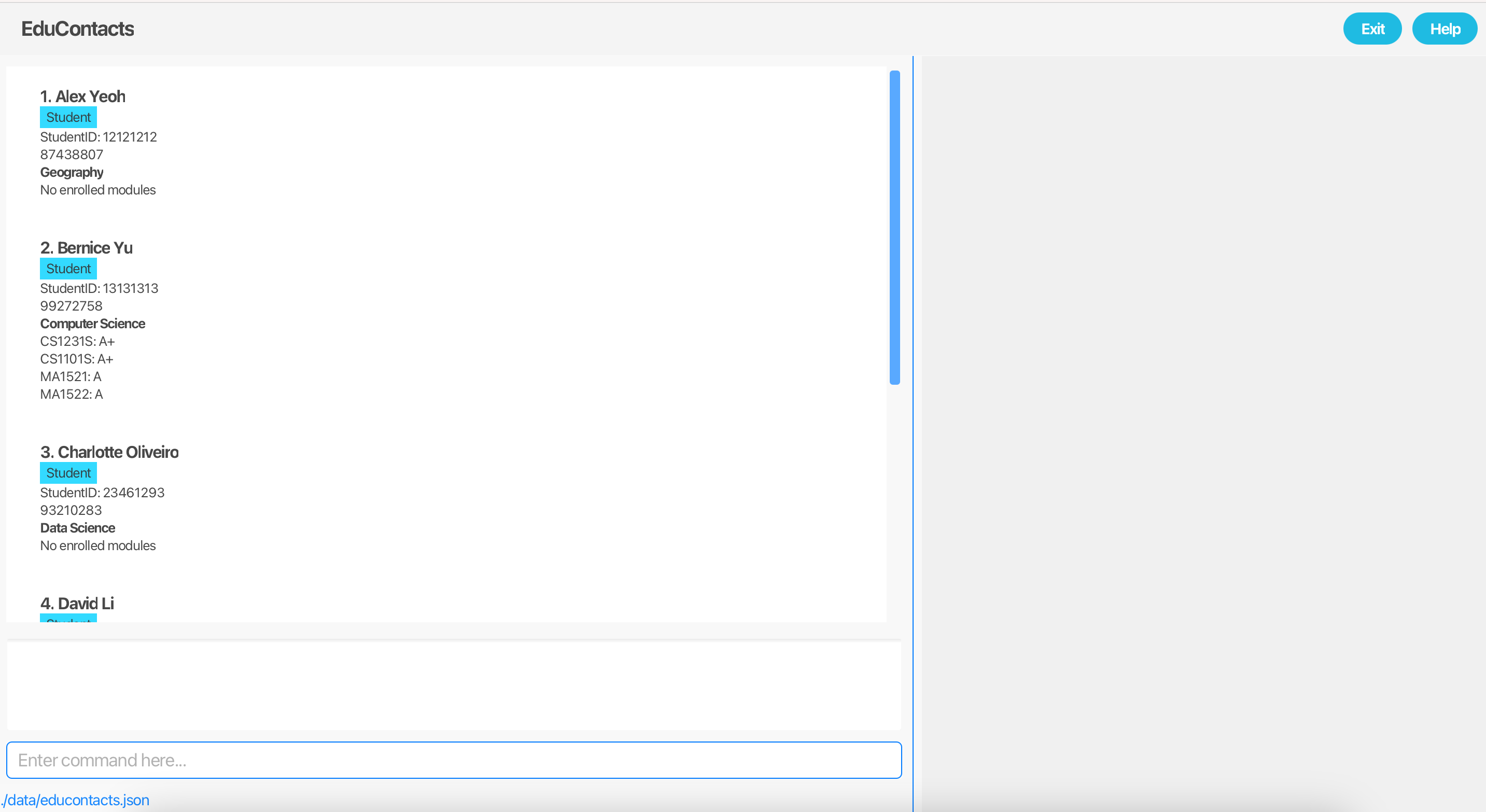
java -jar educontacts.jarA GUI similar to the screenshot below should appear in a few seconds. Note how the app contains some sample data.
Saving window preferences
Resize the window to an optimum size. Move the window to a different location. Close the window.
Re-launch the app by double-clicking the jar file.
Expected: The most recent window size and location is retained.
Commands Testing
Help Command
Opening the help window
- Test case:
help - Expected: The help window opens, displaying a comprehensive list of available commands and their usage.
Using the help button
- Test case: Click the "Help" button in the application GUI.
- Expected: The help window opens, displaying a comprehensive list of available commands and their usage.
Add Command
Adding a valid person
- Test case:
add 12345678 n/John Doe p/91234567 e/johndoe@example.com a/123 Example Street c/Computer Science r/Student - Expected: A new contact is added with the specified details. The list now includes the new contact, and a success message is shown.
Adding a duplicate person
- Prerequisites: The person to add already exists in the list with the same Student ID
12345678. - Test case:
add 12345678 n/John Doe p/91234567 e/johndoe@example.com a/123 Example Street c/Computer Science r/Student - Expected: The addition fails, and an error message about the duplicate Student ID is shown.
Adding an person with invalid Student ID
- Test case: add 2345678 n/John Doe p/91234567 e/johndoe@example.com a/123 Example Street c/Computer Science r/Student
- Expected: The addition fails, and an error message about the invalid Student ID format is shown.
Edit Command
Editing an existing person
- Prerequisites: List contains a person with Student ID
12345678. - Test case:
edit 12345678 p/98765432 - Expected: The contact's phone number is updated to
98765432. The updated details are shown in the success message.
Editing a non-existing person
- Prerequisites: List does not contain a person with Student ID
00000000 - Test case:
edit 00000000 p/98765432 - Expected: The edit fails, and an error message about the non-existent Student ID is shown.
Editing with invalid input
- Test case:
edit 12345678 p/invalidPhoneNumber - Expected: The edit fails, and an error message about the invalid phone number format is shown.
Filter Command
Filter by name
- Test case:
filter n/John - Expected: The list shows all persons with "John" in their name. A success message is shown.
Filter by course
- Test case:
filter c/Computer Science - Expected: The list shows all persons enrolled in "Computer Science." A success message is shown.
Filter by multiple attributes
- Test case:
filter n/John c/Computer Science - Expected: An error message about invalid multiple filter conditions is shown.
Module Command
Adding a module to an existing person
- Prerequisites: List contains a person with Student ID
12345678. - Test case:
module 12345678 m/CS2103T - Expected: The module "CS2103T" is added to the person's module list. A success message is shown.
Adding a duplicate module
- Prerequisites: The person already has "CS2103T" as a module.
- Test case:
module 12345678 m/CS2103T - Expected: The addition fails, and an error message about the duplicate module is shown.
Adding an invalid module
- Prerequisites: List contains a person with Student ID 13131313.
- Test case: module 13131313 m/CS 2103T
- Expected: The addition fails, and an error message about the invalid module format is shown.
Grade Command
Adding a grade to a module
- Prerequisites: The person with Student ID
12345678has "CS2103T" in their module list. - Test case:
grade 12345678 m/CS2103T g/A - Expected: The grade "A" is assigned to "CS2103T." A success message is shown.
Adding a grade to a non-existent module
- Test case:
grade 12345678 m/CS9999 g/B - Expected: The addition fails, and an error message about the non-existent module is shown.
Adding an invalid grade
- Test case:
grade 12345678 m/CS2103T g/Z - Expected: The addition fails, and an error message about the invalid grade format is shown.
Find Command
Finding an existing person
- Test case:
find 12345678 - Expected: The contact details of the person with Student ID
12345678are shown in the result panel.
Finding a non-existing person
- Test case:
find 00000000 - Expected: An error message about the non-existent Student ID is shown.
Clear Command
Clearing all entries
- Test case:
clear - Expected: All persons are removed from the list. A success message is shown.
Exit Command
Exiting the application
- Test case:
exit - Expected: The application closes successfully without errors.
Navigating Command History
Navigating to previous commands
- Test case: Execute several successful commands (e.g.,
list,add 12345678 n/John Doe p/91234567 e/johndoe@example.com a/123 Example Street c/Computer Science r/Student,filter n/John). Then, press the UP arrow key in the Command Box. - Expected: Each press of the UP arrow key navigates backward through the previously executed commands, displaying them in the Command Box.
Navigating to next commands
- Prerequisites: Use the UP arrow key to navigate to a previous command in the Command Box.
- Test case: Press the DOWN arrow key.
- Expected: Each press of the DOWN arrow key navigates forward through the command history until the most recent command is displayed. If no newer commands exist, the Command Box becomes empty.
Saving data
Dealing with missing data files
To simulate a missing file, in the same folder as the jar file, navigate to the
datafolder and delete theaddress.jsonfile in the folder.Launch EduContacts by double-clicking the jar file.
Expected: EduContacts is populated by a set of default list of persons. A newaddress.jsonfile will be created in thedatafolder after closing the app or executing a command.
Dealing with corrupted data files
To simulate a corrupted file, navigate to the
datafolder and remove a curly brace at the end of the file.Launch EduContacts by double-clicking the jar file.
Expected: EduContacts has a blank list of persons. A newaddress.jsonfile will be created in thedatafolder after closing the app or executing a command.
Appendix: Effort
Achievements
- As EduContacts is a CLI-based application, we have added the ability for users to navigate through their previous commands using the up and down arrow keys. This helps users accomplish repetitive tasks, e.g. grading a module for multiple persons in EduContacts, way quicker than they would be able to without this functionality.
- We have decided to use a person's student ID as a unique identifier for persons in EduContacts, instead of index like in AB3. The usage of student ID to perform tasks is more intuitive for teachers, our target user group. This therefore optimises EduContacts for teachers.
- We have expanded on the original find command to filter based on course and modules, in addition to name. This command has been renamed to filter to better reflect the functionality of the command.
- We have also refactored the original find command to instead display the full details of a person in EduContacts in a separate panel in the GUI. This allows us to be more selective with what information we display in the PersonCard. We can therefore only display information we believe teachers should be able to retrieve at a glance, e.g. names, student IDs, thus further optimising EduContacts for teachers.
- We have also made various enhancements to the GUI:
- The first enhancement made was the help page. AB3's help page was simply a link to the User Guide, which is not user-friendly. We have therefore taken the liberty of changing the help page to instead contain a summary of the commands supported by EduContacts, including their formats and example usages.
- We then updated the GUI to include a separate panel to display student details when the find command is executed.
Effort Required
We have put in a significant amount of effort in this project, with close to 2,000 commits over 15,000 lines of code contributed. We estimate that our effort for the project is about 50% of that spent on creating AB3.
Challenges Faced
- The first major roadblock in our project was storing modules in JSON format. Modules for a Person object is stored as a Collection, much like Tags in AB3. However, modules also have a Grade field, whereas Tags in AB3 do not have. This added a layer of complexity that we did not expect, and a longer amount of time had to be invested to work out the issue.
- The second challenge we faced was using student ID as a unique identifier for persons in EduContacts instead of index. This task was more complicated that we initially anticipated, as there were many unforeseen use cases that we had to take into consideration. This includes duplicate student ID handling, handling cases where a person with a specified student ID exists in EduContacts but not in the currently displayed list, and so on. A lot of scrutinising and attention to detail was required to ensure our commands were bug-free and the command error messages displayed were correct.
Difficulty Level
Our project requires a relative high level of understanding of the code base. Due to the change to make student ID the unique identifier for persons in EduContacts, we needed a high level of understanding of how the various command parsers and argument tokenisers work in order to implement bug-free code.
Additionally, we had to have a good understanding of our JSON and the Jackson library worked in order to implement modules in our project.
Finally, we have also made numerous updates to the GUI, which was tough as we were all relatively new to JavaFX. We therefore rate the difficulty level of our project as medium to hard.
Appendix: Planned Enhancements
The following planned enhancements are proposed by the development team (team size of 5) to be implemented in the near future.
These are current known issues or feature flaws related to the design of the application that have been identified. These enhancements are not critical to the usability of the application for its intended use case, but rather highlight potential mis-steps in the design process of the application by the development team.
The implementation for the planned enhancements required to improve these known issues/feature flaws have been deferred for future iterations as the development team feels that the effort required to fix these known issues/feature flaws outweighs their value add to the user at this current stage of development.
1. Overly General Error Message for Duplicate Command Word
Feature Flaw: The application currently displays a generic "Invalid command format" error message when duplicate command words are entered. This can be confusing and unhelpful to users. For instance:
- Input:
edit edit xxx - Current Error Message: "Invalid command format"
- Suggested Error Message: "Duplicate command word:
edit."
Enhancement: Implement a granular exception handling mechanism to specifically detect and report duplicate command words. This will involve:
- Parsing the user input to identify repeated command words.
- Providing an error message tailored to the specific issue.
Justification for Deferral:
- While improving error messages is valuable, the current placeholder messages are functional and convey basic information.
- Developing tailored error handling requires significant effort that could be redirected toward implementing higher-priority features.
- Addressing this issue after the application achieves a more stable feature set ensures that the error-handling logic does not require repeated revisions due to ongoing changes in the application.
2. Overly General Error Message for Duplicate IDs in Commands
Feature Flaw: When duplicate IDs are entered in commands, the application currently provides a generic "Invalid command format" error message. This does not clearly communicate the issue to the user. For example:
- Input:
find ID ID - Current Error Message: "Invalid command format"
- Suggested Error Message: "Duplicate
IDdetected, only one allowed."
Enhancement: Introduce specific error handling to detect and report duplicate IDs in user commands. This will involve:
- Validating commands to identify duplicate ID arguments.
- Displaying a clear error message, e.g., "Duplicate
IDdetected, only one allowed."
Justification for Deferral:
- The current generic error messages fulfill their basic purpose, ensuring that invalid commands are rejected.
- Implementing fine-grained validation and error reporting for duplicate IDs requires significant effort, including modifying command parsing logic.
- Addressing this issue in a future iteration, when core features are complete and stable, avoids unnecessary rework of error-handling logic.
3. Address Help Command Popup Window Stability Issue
Known Issue: On certain platforms (notably MacOS), running the help command and closing the popup window repeatedly in quick succession while in full screen can cause the application to hang or crash.
Proposed Enhancement:
- Improve the robustness of the
helpcommand by enhancing resource management and concurrency handling to prevent hangs or crashes. - Note: Consideration was given to displaying the help page within the main application window instead of a popup. However, the popup design was retained because it allows users to reference the help page alongside the main application, providing greater convenience and usability.
Justification for Deferral:
- The issue arises only under specific conditions (frequent execution of the
helpcommand in quick succession in full screen), making it less critical compared to other bugs or enhancements. - Implementing a fix requires significant effort to revamp resource and concurrency management, which could detract from more pressing development priorities.
- The current implementation functions adequately for standard use cases, making this issue suitable for resolution in future iterations when higher-priority tasks are completed.
4. StudentID as Duplicate Detection Mechanism
Feature Flaw: All contacts are currently identified by their StudentID. This approach is restrictive, especially for non-student contacts like tutors or colleagues, and relies on dummy IDs as a workaround for non-students.
Enhancement: Introduce a more robust identification mechanism outside of StudentID to distinguish between students and other contact types. For example:
- Add a flexible identification field applicable to both students and non-student contacts.
- Allow unique identifiers based on role type.
Justification for Deferral:
- Implementing this enhancement requires significant refactoring of the
Model,Storage, andLogiccomponents, including data representation, validation processes, and storage formats. - The current system is sufficient for the primary use case (managing students and student tutors). Workarounds like dummy IDs enable limited handling of non-student contacts for now, making this a lower-priority enhancement.
5. Support for Multiple Filter Conditions
Feature Flaw: The filter command currently has two limitations:
- It only supports one filter condition, which restricts its flexibility and utility for complex searches.
- The error message for multiple filter conditions is overly general and does not explain the limitation. For instance:
- Input:
filter c/Computer Science n/Crowe - Current Error Message: "Invalid command format"
- Suggested Error Message: "Only one filter condition allowed."
- Input:
Enhancement: Extend the filter command to support multiple filtering conditions. This will allow users to specify multiple conditions for filtering contacts with a toggle functionality to choose between:
- AND (strict search, matches all specified conditions).
- OR (broad search, matches any of the specified conditions).
Justification for Deferral:
- Implementing support for multiple filter conditions and adding toggling options requires substantial modifications to the
LogicandParsercomponents to manage complex search constraints effectively. - Enhancing error messages and expanding filter capabilities would also necessitate updates to input validation and testing.
- The current implementation provides basic filtering functionality and adequately meets the needs of most users, making this enhancement a lower priority compared to the resolution of critical bugs and the development of core features. By addressing this enhancement in a future iteration, the changes can better align with potential expansions to filtering capabilities.
6. Toggle for Partial vs Full Matching in Filter Command
Feature Flaw: The current behavior of partial or full matching in the filter command depends on the field being filtered, which may confuse users.
Enhancement: Add a toggle feature to allow users to choose between:
- Partial matching: Matches substrings (e.g.,
CS21matchesCS2103T). - Full matching: Matches exact strings (e.g.,
CS2103Tmatches onlyCS2103T).
Justification for Deferral:
- Introducing toggles requires updates to the
LogicandParsercomponents to interpret and handle matching options. - The current partial matching behavior is sufficient for most searches and can be deferred until other higher-priority enhancements are completed.
7. Support for Additional and Customizable Roles
Feature Flaw: The application currently supports only Student and Tutor roles, limiting its applicability for broader use cases.
Enhancement: Update the role types to include specific roles such as Colleague and customizable generic roles like Other. For example:
- Add predefined roles such as
Colleague, andIT. - Allow users to define custom role types to suit their specific needs.
Justification for Deferral:
- This enhancement requires significant modifications to the
Model,Logic, andStoragecomponents to handle additional and customizable roles. - The current implementation meets the basic needs of most users by supporting the essential roles (
StudentandTutor), making this enhancement a lower-priority task compared to core feature developments.
8. Support for Contacts Being Tagged with Multiple Roles
Feature Flaw: Each contact can only be assigned one role, which limits flexibility in scenarios where a person fits into multiple categories (e.g., a student who is also a part-time teaching assistant/tutor).
Enhancement: Allow contacts to hold multiple roles where logically appropriate. For example:
- A contact can have the roles
StudentandTutorsimultaneously if they are a part-time teaching assistant. - Validation logic should ensure logical combinations (e.g.,
StudentandColleaguecannot co-exist).
Justification for Deferral:
- Supporting multiple roles per contact requires significant updates to the
Modelto support role combinations, as well as changes toLogicandUIfor input validation and display. - The current implementation, which enforces a single role per contact, is sufficient for the majority of use cases and avoids potential complexity or confusion in managing contacts, making this enhancement a lower-priority task at this stage.
9. Enhanced Module Utility
Feature Flaw: The current module utility only supports tracking modules, limiting its value for users who might want to track additional details like assignment grades or attendance.
Enhancement: Expand the module utility to allow customization, such as the ability to rename Module to Assignments, for example.
Justification for Deferral:
- Significant updates to the
Model,Storage, andUIcomponents are required to support flexible customization. - The current utility is sufficient for basic module tracking, making this enhancement a lower priority.
10. Module Not Applicable for Certain Contacts
Feature Flaw: Tutors and non-student contacts may not need a module field, but the current implementation does not allow this distinction.
Enhancement: Add an option to mark the module field as "Not Applicable" for specific roles (e.g., Tutor, Colleague).
Justification for Deferral:
- Implementing this feature requires structural changes to the
Modeland updates to validation logic. - The current system works with placeholders, and this limitation does not significantly impact functionality, making it a lower-priority enhancement.
Appendix: New Features
The following are new features planned that add additional functionality to our application. (Not to be confused with Planned Enhancements)
Undo command
- Description: Allows users to revert the most recent change made to the application’s data.
- Benefits
- Provides users with the flexibility to correct mistakes quickly without manually re-entering data or commands.
- Minimizes the impact of accidental commands (e.g., mistakenly deleting or editing a contact).
- Reduces frustration and saves time for users by eliminating the need to redo lengthy or complex data modifications.
Data archiving
- Description: Allow users to move inactive or irrelevant entries to an archive.
- Benefits:
- Reduces clutter in the main data set, making it easier to manage and navigate active records without losing historical data.
- Lower the load on real-time data processing by isolating inactive records.
- Retain archived data for historical records or compliance requirements.
- Provide a safe way to store inactive data without risking deletion or loss.
Importing contact data
- Description: Allow users to import contact data from multiple formats (e.g. CSV, vCard)
- Benefits:
- Saves time and effort by allowing users to easily populate the app with data, eliminating the need for manual data entry.
- Maintain consistent contact records across different applications and devices.
- Simplify the process for new users by letting them import contacts directly.
- Enable users to restore contacts from external files in case of data loss.
Exporting contact data
- Description: Allow users to export contact data to multiple formats (e.g. CSV, vCard)
- Benefits:
- Allow users to easily transfer their contact information to other applications or storage solutions.
- Provide users with the ability to create backups of their contact data.
- Enable users to share their contact lists with others.
- Allow users to organize and manipulate their contact data externally.
- Help users comply with data export regulations or organizational policies.